

Spectronaut 15 带着众多性能改进、功能更新于6月15日晚正式发布。在新一代深度学习算法的加持下,DIA数据分析的性能和DDA的差距进一步扩大。
新版本详细介绍视频(中文校正版):
Mann课题组单细胞DIAPASEF介绍(中文自动翻译)及Q&A:
Spectronaut 15 主要更新内容如下
定性能力提升: 谱图库DIA和directDIA结果均有明显提升
定量改进:整合MaxLFQ算法,提升定量准确性
全面的PTM分析功能:PTM位点分析全面升级,你想要的都有了
改善用户体验:增加大量DIA数据可视化功能
深度学习:改进机器学习算法显著提升免疫多肽和离子淌度数据分析能力
定性能力提升
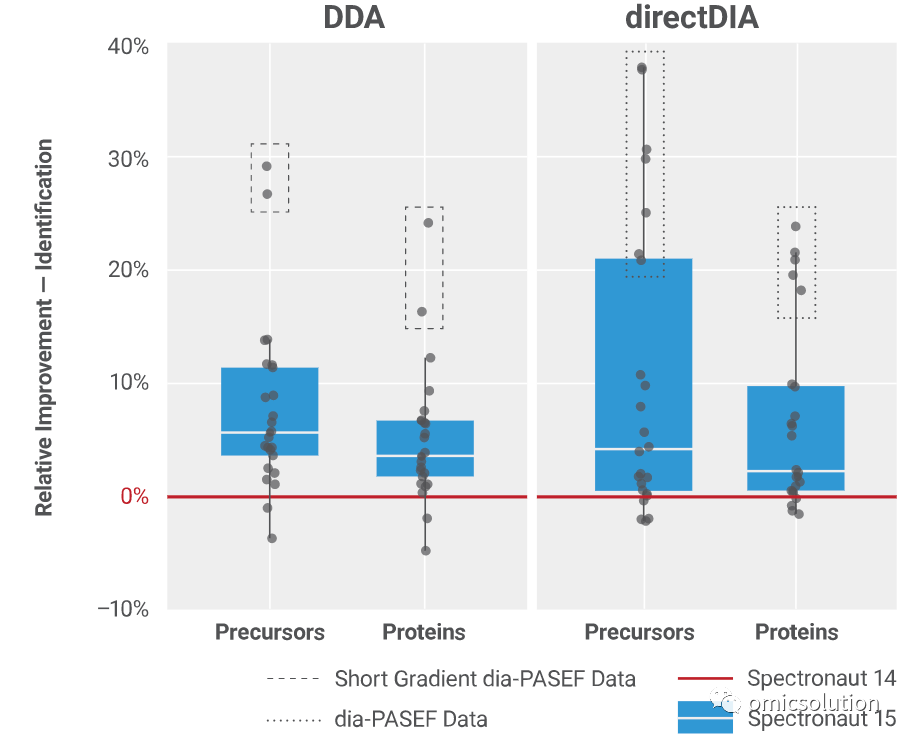
相对于Spectronaut14来说,新版本在显著提升了DIA-PASEF数据的定性能力,基于谱图库或directDIA均有15-30%的提升。非DIA-PASEF数据实现了5%-20%的提升。
提升灵敏度的同时,SN15引入基于单个run的FDR控制算法,能够大显著改进FDR的准确性同时不牺牲灵敏度。
定量改进
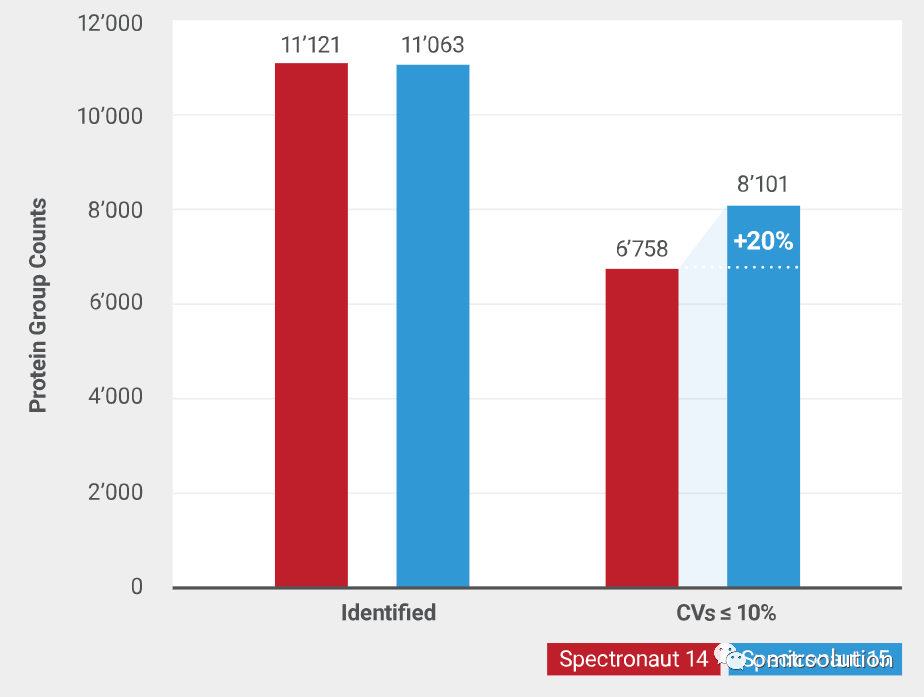
DIA分析的核心痛点是定量的准确性。Spectronaut15中加入了MaxLFQ算法,在CV不变的情况下,进一步提升了可定量的母离子比例。
全面的PTM分析功能
PTM定量分析,位点置信度及位点定量分析是目前蛋白质组学中的核心关切点,而大部分分析软件都依赖于研究者自行进行位点拆分、定量和解读。
SN15的PTM专属分析流程为您带来一键式的位点置信度、定量、差异分析功能,同时全部支持可视化查看,为您的修饰定量插上翅膀。
相关详细介绍可以参考官方简介视频:
DIA数据可视化改进
对于商业化数据分析软件来说,可视化界面的使用体验是其相对于免费软件的重要优势之一。
在SN15中,我们加入了全新的以蛋白为核心的结果查看、差异展示和离子淌度可视化界面。
详细用户界面改进参见官方视频介绍:
Spectronaut用户请连接上互联网后点击About界面自行更新。
如需进一步帮助欢迎和我们联系。
详细更新日志:
More Identifications
Improved identification with new scores, especially for short gradients
Up to 35% more precursor identifications for directDIA with diaPASEF
Up to 10% more precursor identifications for directDIA in general
Up to 30% more precursor identifications for short gradient DIA analysis with library
Up to 10% more precursor identifications for DIA analysis with library in general
Accurate Quantification
Improved default settings for quantification
New MaxLFQ based protein quantification
Up to 15% more protein identifications with CVs below 10% in controlled quantitative experiments
Improved Ion Mobility Support
Ion Mobilogram visualization for dia-PASEF
Ion Mobilogram based manual peak refinement
Up to 30% faster processing of dia-PASEF data
Added optimal support for high-sensitive py5 dia-PASEF method
General DIA Analysis
New Run-wise protein FDR calculation and filtering
New peptide posterior error probability (PEP) filtering
Improved flexibility for directDIA search settings
Improved multi-channel quantity summarization
Command line support for SNECombine workflow
New “Method Evaluation” workflow with directDIA
Comprehensive PTM Analysis
Site collapse calculation
Site regulation analysis
Modification specific normalization filter for enrichment workflows
New PTM site report
Pulsar Database Search Engine
Improved performance for large protein databases (> 2 GB) with Pulsar
Improved identification and performance for unspecific searches
Deep-learning Augmented Improvements
Prediction for ion mobility (1/K0) during library generation
Improved fragment prediction for unspecific peptides
New Post Analysis Features
Added PCA analysis
Added custom selection for protein rank plot
Added custom selection for volcano plots
New PTM Analysis node
Improved User Experience and Visualization
Improved Protein Coverage plot
PTM support
Peptide tooltip and highlighting
New sub-perspective “Protein Grid View” in the analysis perspective
Improved XIC Alignment plots with support for unlimited number of runs
Detachable perspective and plots for side-by-side visualization
Improved XIC grid overview plots
One-Click tree navigation in plots
Improved plot and tree filter selection
Quick-Action bar for analysis perspective
Improved warning messages with actionable links
Improved UI for analysis log
Updated Analysis Summary plot for easier access
Other Changes
Report Perspective Changes
New PTM site level report when performing PTM localizationPage
DIA Analysis Settings Changes
Default row filtering for quantification changed from Q-value to Q-value Sparse
Default quantification strategy changed from Quant 2.0 to Auto, where it will use MaxLFQ if analyzing less than 500 runs
Default normalization strategy changed from Global Normalization to Auto, where it will use Local Normalization if analyzing less than 500 runs
New PTM workflow node in the setting
directDIA Analysis Settings Changes:
New Method Evaluation setting in directDIA settings → Workflow → Method Evaluation
Distinguish between Pulsar and DIA analysis settings for directDIA for more flexibility